Dashcams have become essential to the modern driving experience, offering peace of mind and safety on the road. One increasingly popular feature is Wi-Fi connectivity. But what exactly is Wi-Fi used for in a dashcam, and how does a WiFi dash cam work? Let’s explore how dashcam WiFi enhances functionality and convenience for users.
Seamless Data Transfer
Wi-Fi-enabled dash cams, such as the V7 Pro블랙박스, allow for quick and wireless file transfers.
This means users no longer need to remove the memory card or connect the dashcam via cables. Whether it’s a dash cam with built-in WiFi or a wireless front and rear dash cam, this feature streamlines the process of accessing footage directly on your smartphone using apps like WhatsGPS.
Remote Access and Live Streaming
WiFi functionality allows dashcams to support real-time video access and live streaming through mobile apps.
With models like the V7 Dash Cam Pro, drivers can view the camera feed remotely, which is especially handy when the vehicle is parked. For fleet owners and families, this offers added security through a connected dash cam system.
Easy Firmware Updates
Wi-Fi-enabled dash cams make software maintenance easier.
Instead of downloading files to a computer, updates can be installed directly via a wireless connection. This keeps your WiFi car camera or Bluetooth dash cam running with the latest features and bug fixes.
What Does Wi-Fi Do in Dash Cams?
Wi-Fi serves many functions in a dashcam setup, going far beyond simple video transfers.
Let’s break down the features that make WiFi dash cameras for cars an intelligent investment:
Wireless Video Playback
Instead of unplugging the SD card, you can use a WiFi dash camera app to view video directly on your smartphone. This is especially useful in emergencies where instant playback is needed.
File Management on the Go
Using a dedicated app such as WhatsGPS or the app, users can organize footage, delete old files, or share clips directly from their phone, eliminating the need for extra hardware.
Real-Time Alerts
Some advanced dash cams with GPS and WiFi notify users about motion or 중요한 안전 기능입니다. If your vehicle is parked and disturbed, you’ll receive a real-time alert on your smartphone, making this feature crucial for parked-car surveillance.
Advantages of Having Wi-Fi in Dash Cams
Wi-Fi in dash cams brings numerous real-world benefits for drivers and passengers alike.
Here’s how this tech boosts your driving experience with wireless dash cameras for cars:
Passenger Entertainment
When integrated with a WiFi car DVR or hotspot, passengers can access the internet for music, videos, or games. Dash cams like the Valhalla V7 Pro dash cam built-in WiFi, can double as an entertainment hub.
Driver Navigation
Wi-Fi helps navigation apps connect to real-time traffic data. Combined with a dash cam GPS, it ensures smoother and smarter route planning—ideal for road trips or daily commutes.
Multi-Device Connectivity
Modern wireless dash cams support multiple simultaneous connections, so everyone in the car can stay online. It’s a welcome feature for families and teams who need consistent connectivity.
Which Dashcam Models Come with Wi-Fi?
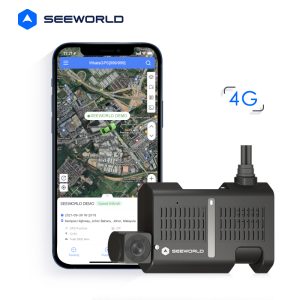
Plenty of dashcams offer WiFi and GPS features, but one standout model is the V7 Pro Dashcam.
Here’s what sets the V7 Pro apart among other WiFi dash cams and wireless dash cams for car front and rear options:
High-Quality Video Recording
The V7 Pro features dual-lens recording—1080P front and 720P inside the cabin—ensuring clear visuals of both road and interior activities.
Two-Way Communication
This smart dash cam includes a speaker system that allows for remote conversations, which is ideal for fleet management and ride-share drivers.
V7 Pro 4G Dual Channel Driving Dash Cam
Real-Time Video Monitoring
With WiFi connectivity, users can view live streams from the V7 Pro anytime using a connected app, offering increased control and safety.
Emergency SOS Feature
Some dash cams offer an SOS button to send emergency alerts, an essential feature in case of road accidents or breakdowns.
결론
From dash cam WiFi connectivity to live streaming and real-time updates, having a WiFi-enabled dash cam like the V7 Dash Cam Pro enhances your driving experience. Whether you want easier access to footage or smarter vehicle monitoring, investing in a wireless dash camera for your car is a practical and forward-thinking choice.
Whether you’re driving for business or leisure, dash cams with WiFi and GPS are becoming standard tools for safer, smarter travel.